Workforce safety and compliance for trade contractors
Manage your whole safety department in one place.
Ditch the binders and spreadsheets. Training certs, accident and injury reports, drug screening and more, all in one system.

- On every device you useUse it on a desktop, iPad or iPhone, wherever you are. It installs from a link, with no app store.
- Know before it expiresConfigure advance reminders so employees and responsible supervisors can address expiring qualifications before they're overdue.
- Records you can find and exportTraining records, incident documentation and reports are available for review or export. Pull a person's training or build a job packet PDF in minutes.
- Get statements without the chaseInvolved employees and witnesses fill out their statements on a phone or the kiosk and sign with their PIN.

The application
Built for how safety teams actually work.
From employee training and certifications to incident reporting, field safety, and subcontractor management, CrewSafety supports the work your team handles every day.
- Customizable Safety Dashboards Build dashboards around what matters to you. Choose from 100+ cards, arrange your layout, and switch between views for training, incidents, safety performance, and more.
- Training & Certifications Track employee qualifications, required training, and expiration dates. Configure advance notifications so you can address upcoming renewals before credentials expire.
- Jobsite Safety & Projects Keep each project's crews, JHAs, incidents, observations, safety concerns, employee qualifications, and subcontractor documentation organized together.
- Incident Management & OSHA Records Document incidents, collect statements, maintain case records, and manage OSHA 300 and 300A logs, with documentation organized for follow-up and reporting.
- Subcontractor Safety Management Track subcontractor crews, safety documentation, incidents, and observations across projects. Monitor safety scores and communicate performance concerns.
- Safety Management, Wherever You Work Supervisors can manage safety activities from the field, while employees access their own training, notifications, assigned policies, and forms from their devices.
- New Hire Onboarding Guide new hires through job-specific training, company policies, paperwork, and assessments using a kiosk workflow that tracks their onboarding progress.
- Drug Screening & Random Draws Track screening referrals, review pending screens and set a schedule for random draws.
- And that's just the beginning. These are just a few of the tools CrewSafety offers. Explore the full application and see what else you can manage. Explore all features
The person
See everything about an employee in one place.
See training records, qualifications, paperwork, emergency contacts, and profile details in one place. CrewSafety helps you keep employee information organized and shows what is current, expiring, missing, or still needs attention. Instead of chasing paperwork across folders, emails, and binders, your team can open one profile and quickly understand where that employee stands.
- See employee training, qualifications, and paperwork in one place.
- Keep emergency contacts and administrative records connected to the employee profile.
- Know at a glance what is current, expiring, or still missing.

Incident management
From the first report to the final follow-up.
Report incidents, accidents, and near misses from the office or directly in the field using a computer, tablet, or phone. CrewSafety guides users through identifying what happened and selecting the appropriate reporting process, helping your team capture the right information from the start.
When additional statements or reports are needed, the people involved can be notified directly in the application with instructions on what they need to complete. They can submit their information from their own devices or through a shared kiosk, keeping the reporting process moving without chasing down paperwork.
- Report incidents, accidents, and near misses from the office or jobsite.
- Guided reporting helps identify the event type and the appropriate forms.
- Notify involved employees and collect assigned reports and statements through the application.

The documentation
Professional safety records, ready when you need them.
Turn the information already in CrewSafety into professional, company-branded safety documentation. Generate training certificates, complete incident and near-miss reports, and job packets containing employee qualifications and supporting records.
CrewSafety also helps maintain your OSHA 300 and 300A logs using information from cases identified as recordable, reducing the need to build your annual records from scratch. You review them before you post or file anything. Whether you're providing documentation to a general contractor, reviewing an incident, or preparing records for an inspection, your information is organized and ready to share.
- Generate professional, company-branded training certificates, incident reports, and job packets.
- Create organized documentation for employees, projects, incidents, and near misses.
- Maintain OSHA 300 and 300A logs using information from cases identified as recordable.

The employee app
Your crew. Their records. Right in their pocket.
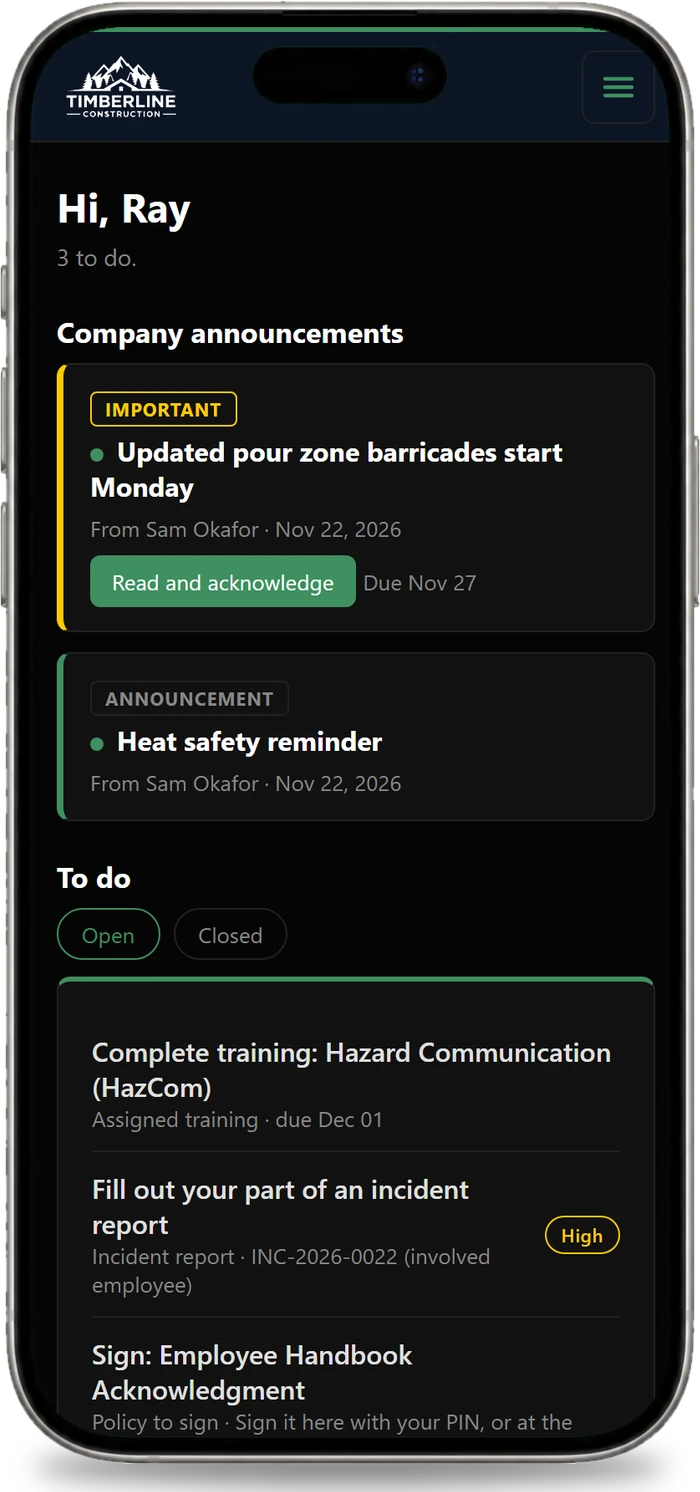
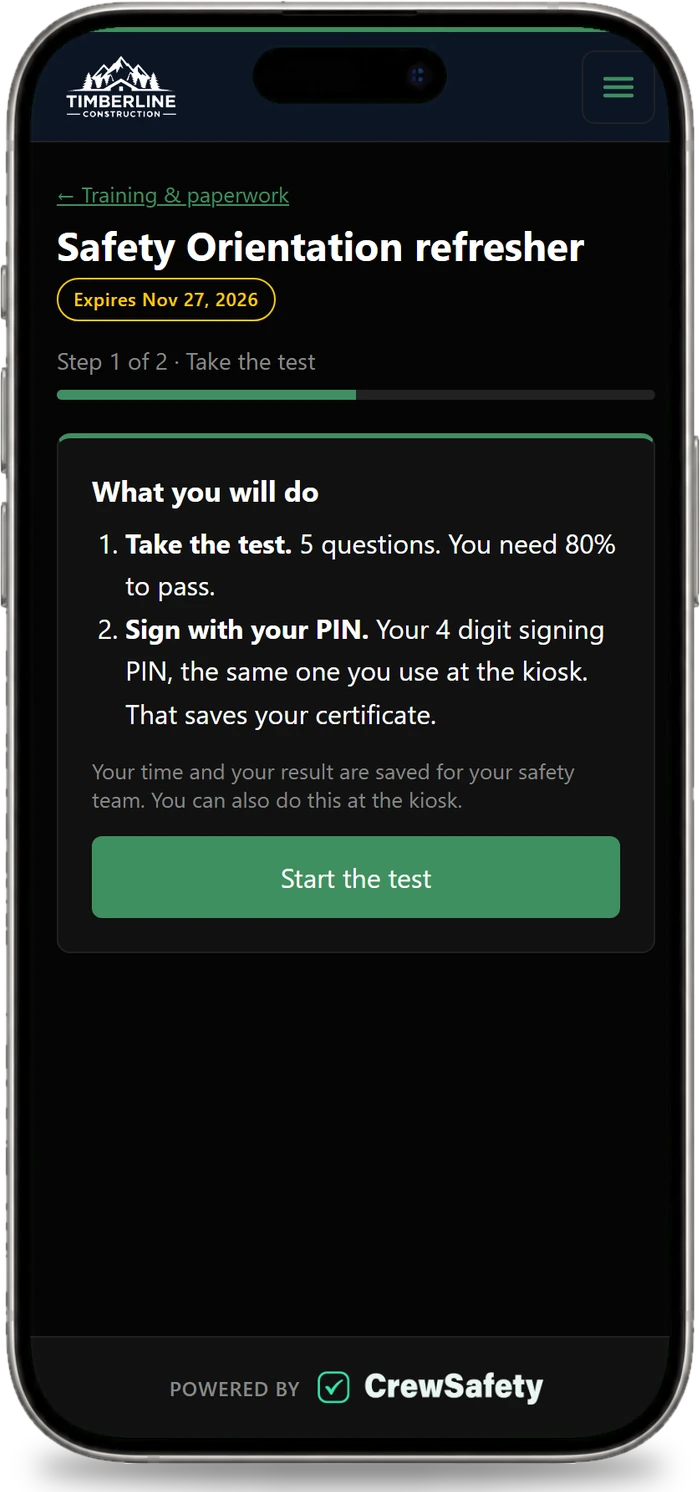
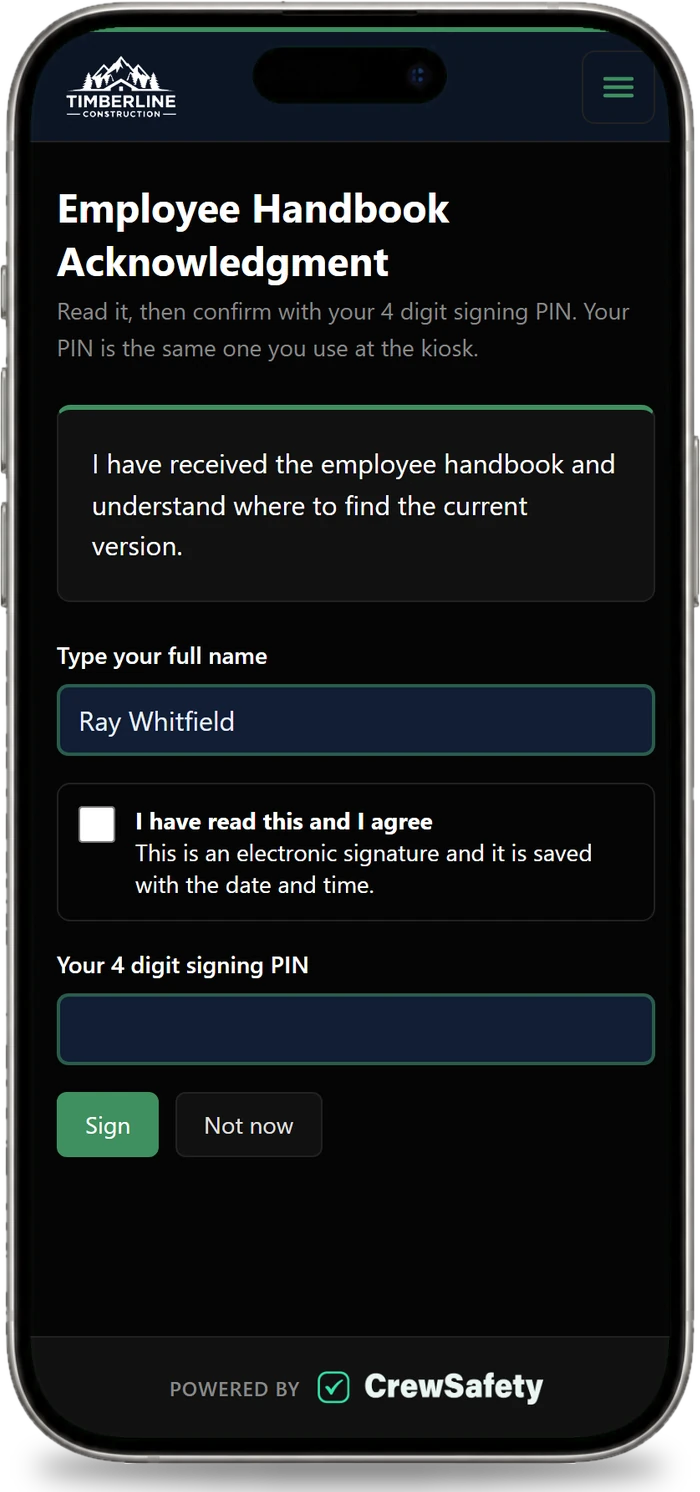
Give employees access to their own training records, certifications, company announcements, and assigned tasks from their phones. They can complete training, take tests, acknowledge policies, and complete assigned checklists and incident statements without having to come into the office.
- View personal training records, certifications, and upcoming expirations.
- Complete assigned training, tests, and policy acknowledgments.
- Receive company announcements, reminders, and requests for information.

The kiosk
One shared kiosk. From onboarding to everyday safety.
Set up CrewSafety on a shared tablet or computer in your shop, office, or jobsite trailer. New hires can work through their onboarding requirements, including completing their employee information, reviewing and signing company policies, and taking the training and assessments assigned to their position. CrewSafety tracks their progress so your team can see what's completed and what's still needed before they head into the field.
For existing employees, the kiosk provides a place to complete required training, take tests, and acknowledge updated policies. Employees can also complete assigned incident and witness reports, report near misses, or raise safety concerns without needing their own device.
- New-hire onboarding: Complete employee information, required training, assessments, and policy acknowledgments.
- Ongoing training: Complete assigned training, tests, and updated policy acknowledgments as requirements come due.
- Incident reporting: Submit incident and near-miss reports, employee statements, and witness reports as part of the reporting process.
- Safety concerns: Give employees a way to report unsafe conditions with their name attached or anonymously.


Pricing
One flat price. Your whole safety program.
No per-user fees or complicated feature packages. Choose a plan based on how many employee profiles you need, with the core CrewSafety application included at every tier.
Up to 5 profiles
Start free. Grow when you're ready.
Get started with up to five profiles at no cost. Paid plans start at $208/month when billed yearly.
- No credit card to start
- Flat monthly pricing
- All features included in every tier
For safety consultants
Multiple clients. One place to manage them.
Manage safety records and activities across multiple client companies without juggling separate logins. Each client has their own company workspace, employees, documentation, and safety records, while you can move between accounts from one dashboard.
- Manage multiple client companies from one account.
- Keep each client's records and employees separate.
- Switch between clients without signing out.

Questions
A few things you might want to know.
01Can we try CrewSafety before paying?
02Will our employees need their own accounts?
03Can we bring our existing employee and training records into CrewSafety?
04What happens when we need to add more employees?
05Can we use CrewSafety on phones and tablets?
06Can we use CrewSafety for multiple locations or projects?
Still have questions? We're happy to help.
Have a question we didn't cover? Reach out and we'll help you find the answers you need.
Contact UsPut your crew in this afternoon.
Load up to 500 people for the first 14 days. When the trial ends, five profiles stay free, every record stays put, and nobody asks for a card.
No sales call. The account is live the moment you sign up.