Built around the person, not the paperwork.
CrewSafety is workforce compliance software for skilled-trade crews that tracks a person's certifications, training, and renewal deadlines, not the day's paperwork. SiteDocs is a well-regarded platform for daily site inspections, safety-form checklists, and equipment walk-arounds, built for a different job entirely. If you're evaluating SiteDocs for a GC, a specialty trade, or a crane and rigging operation, here's the real difference before you decide.
If your team already runs daily inspections and safety-form checklists through SiteDocs, this isn't an argument to rip that out. Inspections and credential tracking are different jobs. The question worth asking is which tool is actually built for tracking who's certified, when that expires, and whether your file would survive an audit today, not just for the checklist a foreman fills out every morning.
CrewSafety is best for...
Knowing who is certified, when it expires, and whether the file would survive an audit today.
SiteDocs is best for...
Running daily inspections and safety-form checklists on site.
The main tradeoff: SiteDocs is the stronger choice for running daily inspections and safety-form checklists on site; it isn't built to watch a certification's expiration date the way CrewSafety is, and its own pricing stays behind a sales call while CrewSafety's is published.
Last reviewed September 18, 2026
Two different top-level records
SiteDocs: the record is a form
A form gets filled out, a checklist gets checked, a photo gets attached to a completed inspection. SiteDocs is a well-regarded tool for exactly that workflow, used widely across construction and industrial sites, and its own site now also names contractor management and worker certifications and training among what it covers. Even so, the record SiteDocs opens to is a form or a site, not a person; a worker's certifications and renewal dates aren't the structure the product is organized around.
CrewSafety: built around the person
The top-level record is a person, not a form. Open one and get their whole standing at once: what they're qualified to do, what expires and when, what they've been through, and what has to happen next. The renewal clock belongs to the credential itself rather than to a form somebody remembered to fill out, so it keeps running whether or not anyone thinks to look.
SiteDocs: pricing behind a sales call
SiteDocs doesn't publish pricing on its own site (sitedocs.com/pricing, checked 2026-08-24). The page describes an annual subscription based on company size and asks you to book a call for a quote. Third-party software directories (itqlick.com, jobsitecerts.com, checked 2026-08-24, not published by SiteDocs itself) report a rate of roughly $29 to $30 per worker per month. Treat that figure as an outside estimate, not a number SiteDocs would actually bill you.
CrewSafety: one flat number, published
CrewSafety publishes every tier's price on /pricing, no sales call required. The Growth tier covers 50 profiles at a flat $649 a month. Third-party directories put SiteDocs around $29 to $30 per worker per month (itqlick.com, jobsitecerts.com, checked 2026-08-24, not published by SiteDocs itself), which works out to roughly $1,450 to $1,500 a month at 50 workers. That arithmetic illustrates the structural difference between per-worker and flat-tier pricing, not a quote SiteDocs would actually give any specific buyer.
Point-in-time inspection records
A completed inspection or safety form tells you what was true on the day it was filled out. That's real, useful evidence, and SiteDocs is built to capture it well, with photos, notes, and a timestamp attached.
A record that knows its own expiry date
Credential risk doesn't work like a daily inspection: nothing looks wrong on the morning you file the form, and the failure arrives on a date nobody is watching. CrewSafety runs the clock on every credential and speaks up weeks before it lapses. Pricing follows headcount rather than feature tiers, and every tier's price is published.
| Dimension | CrewSafety | SiteDocs |
|---|---|---|
| Credential & certification tracking | Core focus | Supported |
| Renewal & expiration alerts | Core focus | Not the focus |
| Daily site inspections & forms | Not the focus | Core focus |
| Contractor management | Not the focus | Supported |
| Incident & hazard reporting | Supported | Supported |
| Worker onboarding | Core focus | Not the focus |
| Pricing | Published, flat per tier (/pricing) | Not published (quote required) |
Choose CrewSafety if...
- You need to know who is certified, when that expires, and whether the file would survive an audit today.
- You want the renewal clock tied to the credential itself, not to a form someone has to remember to fill out.
- You want to see every pricing tier on the site, without booking a call for a quote.
Choose SiteDocs if...
- You need to run daily site inspections and safety-form checklists.
- You want point-in-time evidence, with photos, notes, and a timestamp, captured well.
- Your main workflow is the equipment walk-around, not certification tracking.
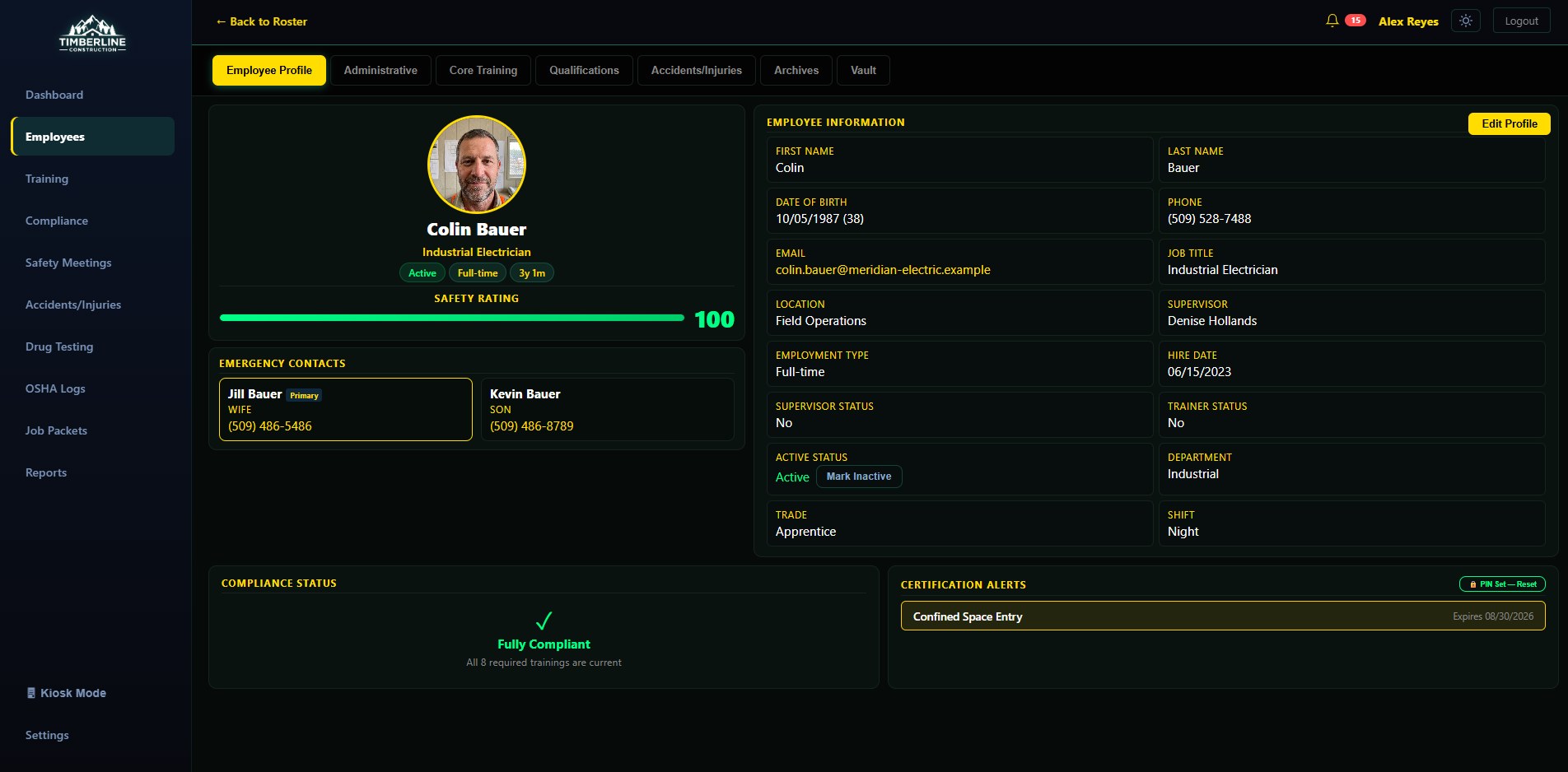
A record that opens to a person, not a form.
This is the entire profile: photo, employment info, emergency contacts, and every certification alert, in one place, the moment you open it. A SiteDocs form tells you what one inspection found on one day. This tells you where a specific person stands right now, without hunting through a stack of completed checklists to find their name.
Questions
What people ask before switching, or adding CrewSafety
Is CrewSafety a replacement for SiteDocs?
Not for daily inspections and safety-form checklists. SiteDocs is built for that workflow and CrewSafety doesn't attempt to duplicate it. CrewSafety is built around a different question: is this specific person, on this specific crew, actually qualified and current on every credential they need today. Many crews run both, one for the daily walk-around, one for who's allowed to be on site at all.
How does CrewSafety's pricing compare to SiteDocs?
CrewSafety publishes every tier's price on /pricing, no sales call required; the Growth tier is a flat $649 a month for 50 profiles. SiteDocs doesn't publish pricing on its own site (sitedocs.com/pricing, checked 2026-08-24); it says pricing is an annual subscription based on company size and requires a call for a quote. Third-party software directories report a per-worker rate around $29 to $30 a month (itqlick.com, jobsitecerts.com, checked 2026-08-24, not published by SiteDocs itself), which is an estimate, not a guaranteed quote for any specific buyer.
Does CrewSafety track daily site inspections?
No. CrewSafety tracks a person's certifications, training history, and renewal deadlines, along with OSHA incident logging and kiosk onboarding, not the daily walk-around inspection a foreman fills out on site. That's the workflow SiteDocs is built for.
Can I use CrewSafety and SiteDocs together?
Yes. They cover different jobs, so there's no conflict running both: SiteDocs for daily forms and inspections, CrewSafety for the credential record that answers whether someone is cleared to be on site at all.
Why would a crew switch from SiteDocs to CrewSafety, or add it alongside SiteDocs?
Usually because a credential lapsed without anyone catching it before an audit or a site walk-on. SiteDocs wasn't built to watch renewal dates; CrewSafety runs the clock on every credential and flags what's expiring weeks out, before the lapse becomes the finding an auditor writes up.
You don't have to decide this from a features list.
Pull your crew's certifications out of static PDFs and put them into a system that actually knows what they mean. The moment you enter a credential, CrewSafety starts tracking its expiration date automatically. No digital filing cabinet required. Five profiles, free forever. No credit card, no sales call.